Locating Bills Not Invoiced
Summary
In this article, you will learn how to Locate Bills Not Invoiced.
Body
Overview
The UGA Financial Management System will allow you to locate Bills that have not been invoiced. You will need to search by customer ID.
In this article, you will learn how to Locate Bills Not Invoiced.
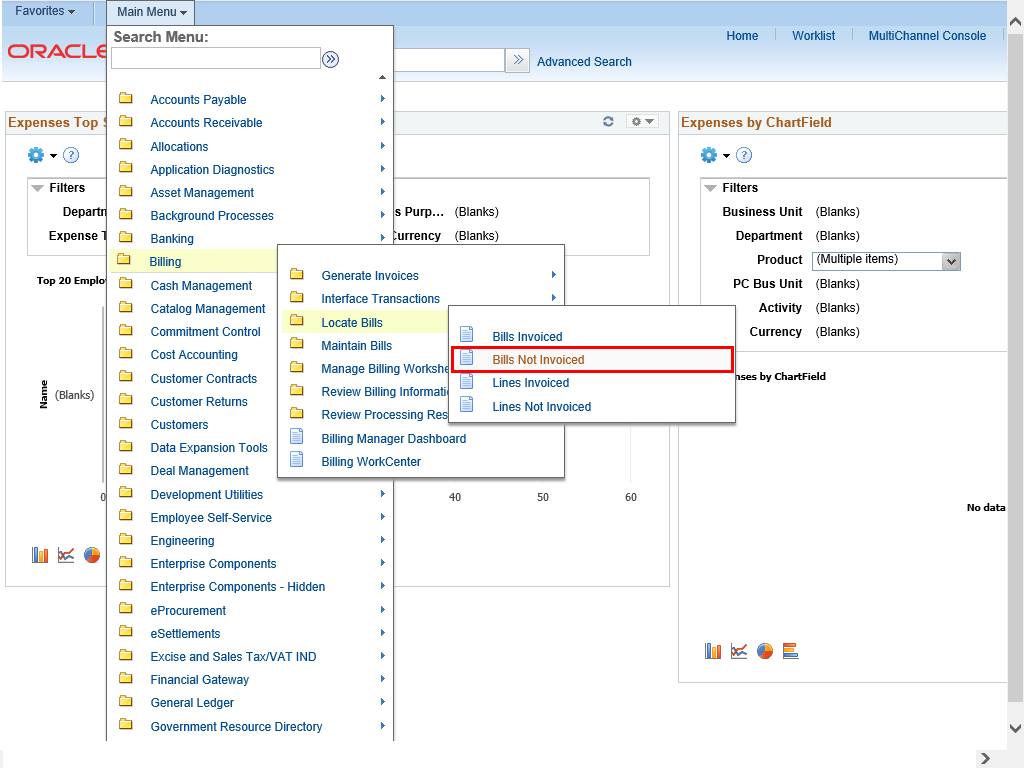 |
To navigate to the Bills Not Invoiced page, select:
Main Menu > Billing > Locate Bills > Bills Not Invoiced
|
|
 |
The Bills Not Invoiced page is displayed. This page is used to search for Bills Not Invoiced by customer ID.
|
|
 |
Enter appropriate information into the Unit field.
Example shown here: "18000".
|
|
 |
Enter appropriate information into the ID field.
Example shown here: "100025".
|
|
 |
The Bill Search Results section will display all Bills Not Invoiced for this ID.
|
|
 |
To view the Bill, click the appropriate Invoice link.
Example shown here: 66-00000025
|
|
 |
The Billing General page is displayed. This page is used to view the Bill Header, Customer Information and Bill Lines information.
|
|
 |
You can review this page to determine if the Bill should have been invoiced and change the Bill Status if appropriate.
|
|
Details
Details
Article ID:
149979
Created
Sat 9/24/22 11:30 PM
Modified
Thu 6/18/26 5:58 PM