Viewing Alternate Approvers for an Employee
Summary
In this article, you will learn the steps to run a query to view alternate approvers for employees.
Body
Overview
You can view any alternate approvers set up for an employee using the query name "UGA_USERS_ALTERNATE_APPROVERS."
In this article, you will learn the steps to run a query to view alternate approvers for employees.
 |
Click the UGA Financials link.
|
|
 |
Click the Query Viewer tile.
|
|
 |
The Query Viewer page is displayed. Enter appropriate information into the begins with field.
Enter " UGA_USERS_ALTERNATE_APPROVERS " into the begins with field.
|
|
 |
The Results page is displayed. Click the Excel SpreadSheet link.
Note: Data has been masked to protect the identity of employees.
|
|
 |
|
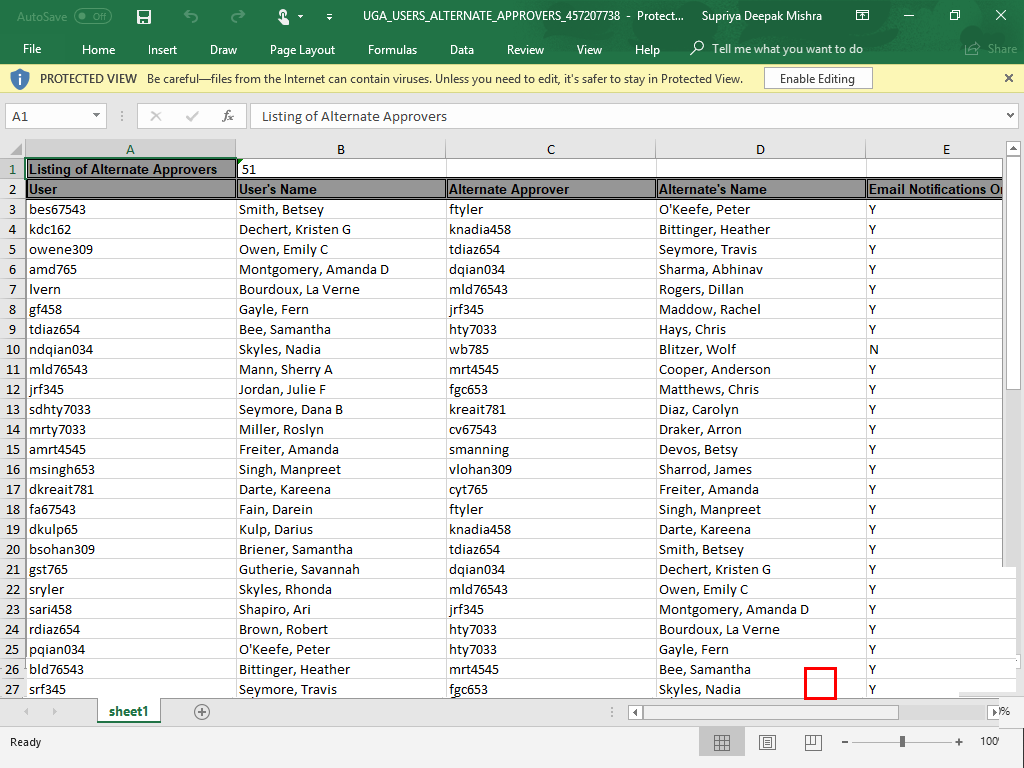
The Excel file for the query result is displayed. You can filter through data to view information you need by user (MyID) or name to find their assigned alternate approver.
|
|
Details
Details
Article ID:
148522
Created
Sat 9/24/22 10:46 PM
Modified
Mon 4/1/24 1:26 PM